Showing posts with label editing. Show all posts

Saturday, May 14, 2022

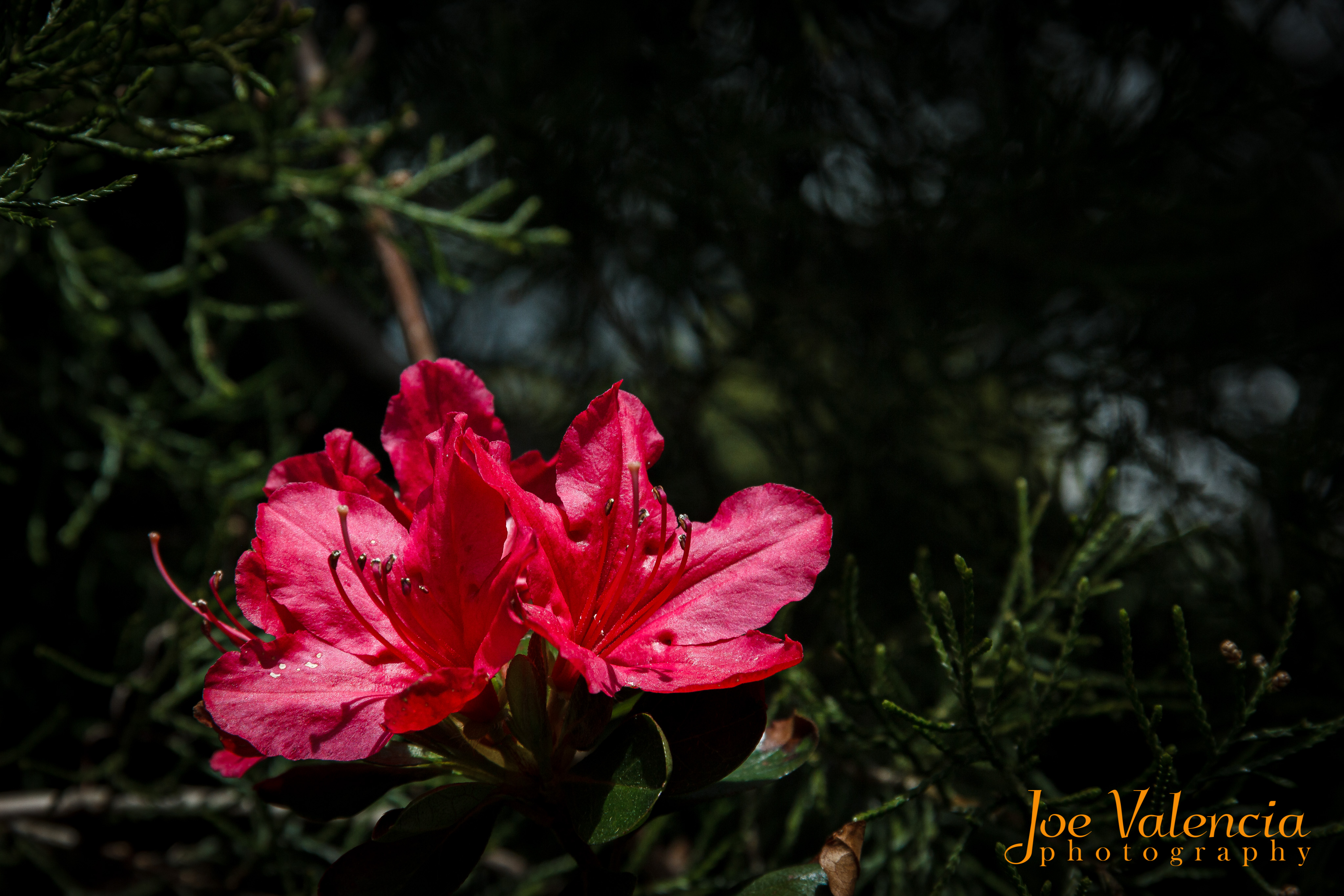
Backyard Discoveries: Azaleas

Azaleas

Azalea Japonica

It was two (2) years ago that I published Lily of the Valley closely followed by Backyard Discoveries here; I also published My COVID-19 Backyard Boredom Project on my other blog. This blog post is a continuation of the project.

Capturing the Images

I live in a neighborhood where everyone has a mailbox at the end of their driveway, most with small flowerbeds planted around them. We have daffodils and a clematis planted in our bed and I often find myself sitting in the street setting up my tripod during various stages of the daffodil's life. I can only imagine how entertaining it must be for any neighbor watching as I try to stand up. 😉 😄 The other side of the driveway has two (2) small shrubs (I forget the name, but they are some type of dwarf shrub), the azalea bush, and an evergreen tree that grew up out of nowhere. I never really paid much attention to that side of the driveway but something caught my eye the other day and I am glad it did.

I noticed the red petals of the azalea against a dark green background, and wondered how many times I have looked at them but never really saw them. I ran (okay, I didn't run, I slowly walked) into the house, put the mail on the table, grabbed my gear and headed back out. It was an overcast day with a bit of a breeze making it challenging to get sharp images - I like to keep my ISO at 100 whenever possible, going as high as 400 if I have to. For those blooms in deep shadow I used a large aperture in order to keep the shutter speed up, something I usually don't do with flowers. The limited depth of field turned out to be a good thing in many of the images, would you agree?

The next day I was back out to the azalea bush again, the sun was out and there was almost no wind. The images used here were made over this two-day period.

Processing the Images

When I started my digital photography journey I shot exclusively in JPEG, mostly because I didn't understand RAW but also because I wasn't a firm believer in Photoshop. I was of the opinion that it was "cheating" and felt that way until a friend brought up Ansel Adams. Ansel was not only a master photographer, he was a master printer; spending hours perfecting the print with dodging and burning, along with other techniques. I realized that Photoshop, and Lightroom, were digital darkrooms and that it was okay to use them.

The majority of my post-processing is done in Lightroom, the only image in this post that saw any Photoshop work is the first one - that is actually a two-image focus stack that was blended in Photoshop after some editing in Lightroom.

Ordinarily, I would open up the shadows, bring down the highlights, bring up the "whites", darken the "blacks" and then do some fine-tuning of the overall exposure, contrast, vibrance, etc.... That was my "standard" editing workflow for quite some time; about the time of my "backyard discoveries" project I started modifying how I edit my flower images and I couldn't be happier with the results.

I start in the Calibration panel by tweaking the Red Primary, Blue Primary, and Green Primary saturation - I don't do anything with the hue or shadows in this panel. It is then that I go up to the Basic panel setting my white balance and then using "auto" to see what Lightroom thinks the image should look like and give me a jumping off point. This is the point that I start to deviate from my "normal" workflow.

Now I darken the overall image, especially the shadows. I use masking - often a radial filter - to work on my subject, brightening it up, opening up some of the shadows, bringing up some vibrance and fine-tuning the contrast. Depending on the image, I may then duplicate this mask, invert it, and further darken the background while decreasing saturation. I like the way this isolates the subject and creates a moody feel to the image. I have the RAW image, as-well-as the finished image, shown here so that you can see the difference.

The Rest

You can see more images from the two days I spent shooting the azalea bush by visiting my Instagram account - specifically here and here. You can see some other examples of this editing technique here and here.

If you enjoyed this post, please do me a small favor and share it with others. You will find buttons for many of the popular social media platforms at the bottom of this post. Thank you!


    Technical information:
  • Camera: Canon EOS Rebel T3i (crop sensor - 1.6 factor)
  • Lens #1: Canon EF-S 18-135mm f/3.5-5.6 IS
  • Lens #2: Canon EF 75-300mm f/4.5-5
  • Tripod: MeFOTO Roadtrip Classic
  • ISO 100 (unless otherwise noted)
  • All focal lengths are as-recorded - the full-frame equivalent in parenthesis.
  • Shutter tripped with wired shutter release.


Friday, September 20, 2019

Is It Real or Is It Photoshop? Does It Matter? Part III – Everyone Else

Note: This is the third, and final, installment in a three-part series titled, “Is It Real or Is It Photoshop? Does It Matter?” The other installments are The Purist and Anything Goes.

The Argument

Is it okay to "Photoshop" your images or is it the ultimate photographic sin?

I have already written about “The Purist” and "The Anything Goes". I conclude the series with “Everyone Else” but before I get into that I want to discuss something I forgot in the first installment; Photojournalism. It is never okay for a photojournalist to manipulate an image - in fact, many (most? all?) news agencies will not allow something as minor as color correction.

Everyone Else

Then we get to the other 99% of us (I am one of you now) who use the computer editing tools to fine-tune our image and make it represent what inspired us to make it. We don't have a problem with adding a touch of magenta to a sunset sky or getting rid of a garbage can in an otherwise beautiful landscape. Yes, I have done both and more. We are the folks

Conclusion

It wasn't until I was having a discussion with a friend (thanks Chris!) that I changed my outlook. He made me look at Photoshop as the digital darkroom that it is. I have come to use the phrase, WWAD - What Would Ansel Do? - to describe my attitude change. Lightroom and Photoshop are nothing more than electronic darkrooms. When I was young and just learning photography I had an old-timer tell me I couldn't call myself a "photographer" until I was able to handle myself in a darkroom. Why does that same mindset now scoff at the electronic equivalent?

In the "Old Days" of analog photography the only "straight from the camera" images were slides (transparencies) and the image was influenced by the film manufacturer and, to some extent, the lab processing the roll. When you shot negatives you had the same influences of the film and the added aspect of interpretation in the printing process. The black & white photographer would dodge and burn his images to get the tonality he wanted - the same for the color photographer but they also had the ability to tweak colors. Then there were the characteristics of the paper used to make the print.

I now shoot in RAW format and edit each of my "keepers"; first in Lightroom and then, if needed, Photoshop. I don't usually go terribly heavy with the edits and very seldom will I remove something from an image. I try to get everything "right" before squeezing the shutter - exposure and composition - but there are times when distractions just cannot be avoided. I don't see any reason why a rogue branch, or other distractions, cannot be removed in post.

While I have no problem with the "Anything Goes" mindset, I have one caveat - if you created something that didn't exist, tell people! Now, I don't mean that you have to explicitly tell people that the collage was "shopped" or anything else that is blatantly obvious. I am talking about when you take two different images and create something - for example, you take an incredible shot of a full moon with an 800mm lens and put it rising behind a shot of the Statue of Liberty. I believe in this instance you should divulge that it is a composite.

I am okay with focus-stacking and exposure blending but some other techniques are a bit more "gray" for me. I have recently heard about "focal length stacking" where you use two different focal lengths and combine to a single image. For instance, if you are hiking thru the mountains and find a peak beautifully framed by trees but it appears a bit small in the composition - you shoot a frame of the peak with a telephoto and the over-all shot with a wider lens - then you composite it in Photoshop. Is this okay to present without explanation? If it is not a dramatic difference, I don't think you have to - what do you think? The same with running water - I have seen photographers take a long exposure to get the silky smooth water but then take a few more at higher shutter speeds to freeze some of the water, and then they combine the images in post. Is this something that should be divulged to your audience? Once again, I think I am okay with presenting the image without explanation.

So, we have come to the end of the series. What do you think? Where do you fall in this spectrum? I would love to hear your thoughts - leave me a comment below.


Wednesday, September 18, 2019

Is It Real or Is It Photoshop? Does It Matter? Part II - Anything Goes

Note: This is the second installment in a three-part series titled, “Is It Real or Is It Photoshop? Does It Matter?” The first installment, The Purist, can be found here.

The Argument

Is it okay to "Photoshop" your images or is it the ultimate photographic sin?

I began the series with The Purist and now move on to The "Anything Goes".

The "Anything Goes"

This is an interesting, and oft-maligned, category of photographer. There are times when images are processed to the point that you cannot even realize it originated inside a camera. I recently saw an image that was purposely made to look like an oil painting; I, myself, have created some images that people mistook for a painting though on my part it was unintentional over-processing. If you have an image you like but the sky is dull and listless - replace it with one you like! In this realm, there is nothing wrong with that and, if done well, no one would be the wiser. Have you ever wanted to ride a camel? Go to a zoo, get an image of a camel and put yourself on it. Are you carrying a half-keg around your waist and want six-pack abs? I saw a Photoshop tutorial about that once - go ahead! You can even fill your yard with a whole menagerie of wild creatures if you want.

My Thought on "Anything Goes"

I don't have any problem with the anything goes mindset. This group never takes "straight from the camera" as a completed image and can spend hours working on a single image that looks nothing like what the camera saw. They take pride in their editing prowess and how they can create what never existed in the physical world. I am one who thinks that photography is an art form and, through extension, photographers are artists. The job of an artist (in my opinion) is to interpret life and present that interpretation to the audience. We tend to categorize artists by their medium - painter, sculptor, photographer, etc... - but at the end of the day they are all artists. I do think, however, there may be a tipping point from being a photographer creating artistic images and an artist using photography as a medium. Does that make sense? Could it be that the "Anything Goes" photographer is actually always the latter and not the former?

Your Thoughts

Are you an Anything Goes photographer? If so, I would love to hear from you and know why. If not, what are your thoughts on the subject?

I will take on "Everyone Else" in my next blog post.


Monday, September 16, 2019

Is It Real or Is It Photoshop? Does It Matter? Part I - The Purist

Note: This is the first installment in a three-part series titled, “Is It Real or Is It Photoshop? Does It Matter?” In each post I will present an image with the question, "Real or Photoshop?" The answers will come in the last installment.

The Argument

Is it okay to "Photoshop" your images or is it the ultimate photographic sin?

If you have been around the photography world for any length of time you have undoubtedly heard people "discussing" the use of Photoshop. I'm sure this argument is as old as photography itself but under various guises, such as photo-manipulation, darkroom manipulation, etc.... There are those who consider themselves "purists" and frown upon any editing - many of these photographers brag about "getting it right in the camera" and label their images as "straight from the camera" or some variation. There are others who fall on the side of "anything goes" and all is fair. I believe most people fall somewhere in the middle - I tend to be one. I will discuss each of these schools of thought in a series of posts.

I will begin the discussion with someone I call, The Purist.

The Purist

It has been my experience that The Purist is the most vocal in this group and, to be fair, counted me as a member at one time. They believe that photography is a representational medium and should only show things as they were at the time the image was made. You can't remove something that you wished wasn't there and, *gasp*, you can never add something that wasn't there. Changing colors, changing hues, adding clouds, removing garbage cans, etc... make veins stick out of the sides of their neck. They don't consider that to be photography. These are also the souls who will argue that you cannot call yourself a photographer unless you shoot manual, but that argument is for another day.

My Thoughts on The Purist

As I mentioned, I used to be a purist. When I first started with digital photography I shunned the idea of processing an image and lived with the jpeg given to me by my camera. To be fair to myself, my first digital camera only allowed for jpeg and my editing suite consisted of whatever Canon gave me with the camera. That said, I was still on the side of only "minor" tweaking such as exposure compensation like you would get from a one-hour photo printer. When I hear someone say, "I like to get it right in the camera." and describe their images as "Straight from the camera." I tend to chuckle a bit. Don't get me wrong - the former is quite important while the latter is not.

It is important to get it right when you squeeze the shutter, if only to reduce the amount of post-processing time. However, it isn't always possible to do that with a single image due to dynamic range and your camera, among other factors. What I take issue with is the "straight from the camera" guy who thinks post-processing is a sin. I argue that you are relinquishing part of your responsibility to the image by allowing the camera to decide what the scene looks like. The jpeg is just an image that was processed based upon the algorithm developed for your particular camera. You let a programmer decide what is important in your image and what it should look like. Imagine that you painstakingly composed your image, manually focused, many set your exposure and then let some software decide what it should look like!

Your Thoughts

Are you a Purist? If so, I would love to hear from you and know why. If not, what are your thoughts on the subject?

I will take on the "Anything Goes" photographer in my next blog post.


Wednesday, April 19, 2017

An Abstract in Yellow

In an earlier blog post, An Abstract in Red, I wrote that I don't often do abstract work. That's true but I do enjoy it from time-to-time. I decided to have a bit of fun with this image, the unretouched image is shown above. This was taken in my backyard a few years ago as I was about to enter the woods for a hike. It was a sunny day and by exposing for the underside of the leaves I totally blew out the sky - not always what you want to do but in this case it made the photograph.

I decided to take the original image and play around a bit. I recently wrote Improve Your Photography: Editing - Selective Color where I discussed highlighting elements of an image by making everything around it monochrome - I did that here. I then decided to invert the mask I used and make the single leaf black & white.

Lastly I just got tight on some of the leaves to make it a little more abstract.

I used this technique just to mask the color but there is so much more you can do - I could have change the black & white selection to red, for instance. This is a great "rainy day" project and a lot of fun. You will need an editing package that allows you to work with masks - I use Photoshop but there are many others, including the freeware GIMP. You can get Photoshop & Lightroom on a subscription basis for $9.99/month - just follow this link

While I guess these aren't "true" abstracts it is about as close as I usually get. It's a great exercise to break out of your comfort zone from time-to-time and shoot things in ways you never have before. In this case I was shooting up which is not something I do a lot of, at least not in this manner. Try getting down on the ground and shoot from a low angle, climb a tree and look down. The possibilities are endless and you will be surprised at how fun it can be.


All photos are copyright Joseph S. Valencia All Rights Reserved They may not be used in any way without express written permission of the photographer. If you wish to use any of the photos you may contact the photographer at valencia32photo@gmail.com

Featured Post

Macro (and Close-Up) Photography - A Whole New World

Macro (and Close-Up) Photography - A Whole New World All photos are copyright Joseph S. Valencia, All Rights Rese...